Open Tasks Dashboard
You can use the open tasks dashboard to see how the open tasks are distributed by individual factors. Refer to the Cockpit Plugins section for information about adding a custom open task dashboard plugin.
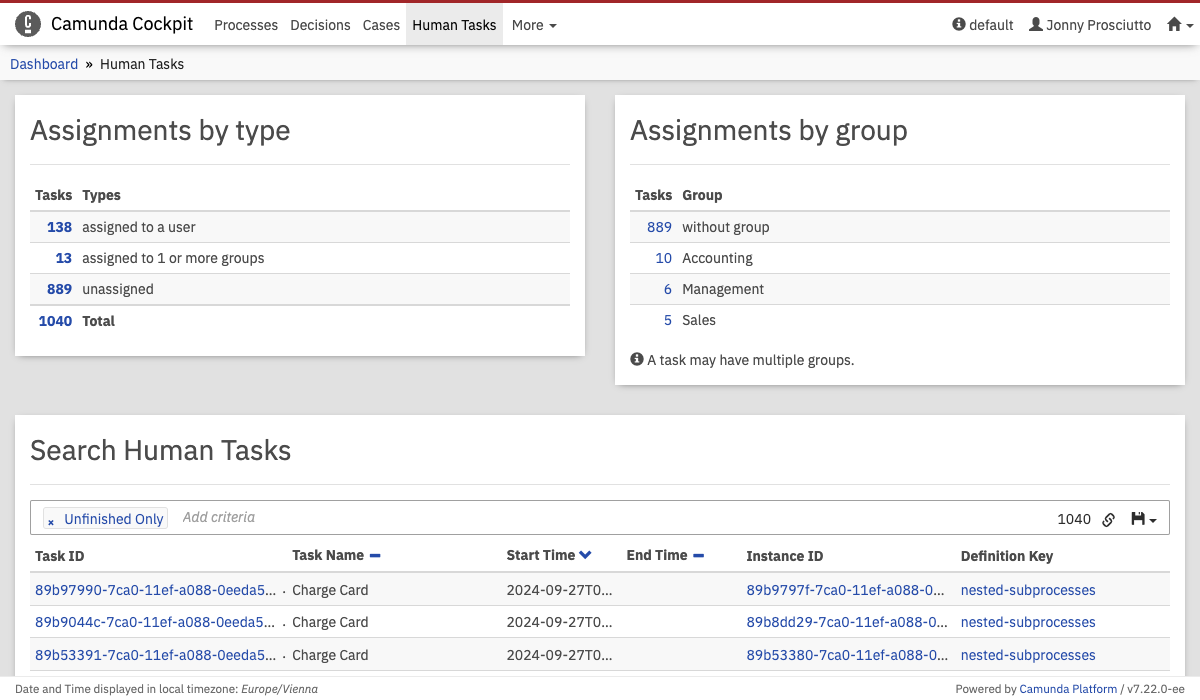 Open Task Dashboard
Open Tasks
Assignments by type
In this category you can see how many open tasks exist. There is also an overview which shows how the open tasks are distributed.
Assignment by group
This category provides an overview that shows how all open tasks assigned to a group are distributed between the individual groups.
Search Tasks
This search lets you search for all tasks. To use the search, you can either use one of the predefined searches or create your own search parameters.
For a predefined search, click the number of one of the summary items from 'assignment by type' or 'assignment by group'.
Furthermore, you can copy a link to the current search query to your clipboard by clicking the button and you can save search queries to your local browser storage by clicking the button and entering a name in the drop-down menu that appears. You can then retrieve the search query by clicking the button and selecting the chosen name in the drop-down menu.
You can use the links in the results to jump to the corresponding process instances. If the task isn't finished yet, the link directs you to the runtime data of the process instance. If the task is finished, you can use the link to move to the historic view of the process instance.