Process Engine API
Services API
The Java API is the most common way of interacting with the engine. The central starting point is the ProcessEngine, which can be created in several ways as described in the configuration section. From the ProcessEngine, you can obtain the various services that contain the workflow/BPM methods. ProcessEngine and the services objects are thread safe. So you can keep a reference to 1 of those for a whole server.
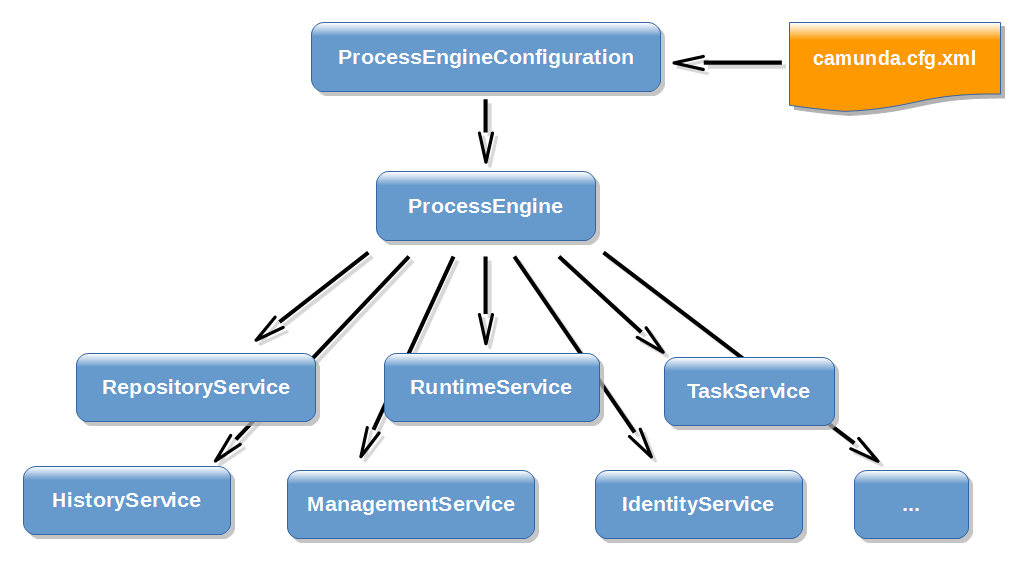 API Services
ProcessEngine processEngine = ProcessEngines.getDefaultProcessEngine();

RepositoryService repositoryService = processEngine.getRepositoryService();
RuntimeService runtimeService = processEngine.getRuntimeService();
TaskService taskService = processEngine.getTaskService();
IdentityService identityService = processEngine.getIdentityService();
FormService formService = processEngine.getFormService();
HistoryService historyService = processEngine.getHistoryService();
ManagementService managementService = processEngine.getManagementService();
FilterService filterService = processEngine.getFilterService();
ExternalTaskService externalTaskService = processEngine.getExternalTaskService();
CaseService caseService = processEngine.getCaseService();
DecisionService decisionService = processEngine.getDecisionService();
ProcessEngines.getDefaultProcessEngine() will initialize and build a process engine the first time it is called and afterwards always returns the same process engine. Proper creation and closing of all process engines can be done with ProcessEngines.init() and ProcessEngines.destroy().
The ProcessEngines class will scan for all operaton.cfg.xml and activiti.cfg.xml files. For all operaton.cfg.xml files, the process engine will be built in the typical way:
ProcessEngineConfiguration
  .createProcessEngineConfigurationFromInputStream(inputStream)
  .buildProcessEngine()
For all activiti.cfg.xml files, the process engine will be built in the Spring way: first the Spring application context is created and then the process engine is obtained from that application context.
All services are stateless. This means that you can easily run Operaton on multiple nodes in a cluster, each going to the same database, without having to worry about which machine actually executed previous calls. Any call to any service is idempotent regardless of where it is executed.
The RepositoryService is probably the first service needed when working with the Operaton engine. This service offers operations for managing and manipulating deployments and process definitions. Without going into much detail here, a process definition is the Java counterpart of a BPMN 2.0 process. It is a representation of the structure and behavior of each of the steps of a process. A deployment is the unit of packaging within the engine. A deployment can contain multiple BPMN 2.0 XML files and any other resource. The choice of what is included in one deployment is up to the developer. It can range from a single process BPMN 2.0 XML file to a whole package of processes and relevant resources (for example the deployment 'hr-processes' could contain everything related to hr processes). The RepositoryService allows you to deploy such packages. Deploying a deployment means it is uploaded to the engine, where all processes are inspected and parsed before being stored in the database. From that point on, the deployment is known to the system and any process included in the deployment can now be started.
Furthermore, this service allows you to
- Query on deployments and process definitions known to the engine.
- Suspend and activate process definitions. Suspending means no further operations can be done on them, while activation is the opposite operation.
- Retrieve various resources such as files contained within the deployment or process diagrams that were automatically generated by the engine.
While the RepositoryService is about static information (i.e., data that doesn't change, or at least not a lot), the RuntimeService is quite the opposite. It deals with starting new process instances of process definitions. As mentioned above, a process definition defines the structure and behavior of the different steps in a process. A process instance is one execution of such a process definition. For each process definition there are typically many instances running at the same time. The RuntimeService is also the service which is used to retrieve and store process variables. This is data specific to the given process instance and can be used by various constructs in the process (e.g., an exclusive gateway often uses process variables to determine which path is chosen to continue the process). The RuntimeService also allows you to query process instances and executions. Executions are a representation of the 'token' concept of BPMN 2.0. Basically an execution is a pointer pointing to where the process instance currently is. Lastly, the RuntimeService is used whenever a process instance is waiting for an external trigger and the process needs to be continued. A process instance can have various wait states and this service contains various operations to 'signal' the instance that the external trigger is received and the process instance can be continued.
Tasks that need to be performed by actual human users of the system are core to the process engine. Everything around tasks is grouped in the TaskService, such as
- Querying tasks assigned to users or groups.
- Creating new standalone tasks. These are tasks that are not related to a process instance.
- Changing which user a task is assigned to or which users are in some way involved with the task.
- Claiming and completing a task. Claiming means that someone decided to be the assignee for the task, meaning that this user will complete the task. Completing means 'doing the work of the tasks'. Typically this is filling in a form of sorts.
The IdentityService is pretty simple. It allows the management (creation, update, deletion, querying, ...) of groups and users. It is important to understand that the core engine actually doesn't do any checking on users at runtime. For example, a task could be assigned to any user, but the engine does not verify if that user is known to the system. This is because the engine can also be used in conjunction with services such as LDAP, Active Directory, etc.
The FormService is an optional service. This means that the Operaton engine can be used perfectly without it, without sacrificing any functionality. This service introduces the concept of a start form and a task form. A start form is a form that is shown to the user before the process instance is started, while a task form is the form that is displayed when a user wants to complete a task. You can define these forms in the BPMN 2.0 process definition. This service exposes this data in an easy way to work with. But again, this is optional as forms don't need to be embedded in the process definition.
The HistoryService exposes all historical data gathered by the engine. When executing processes, a lot of data can be kept by the engine (this is configurable) such as process instance start times, who did which tasks, how long it took to complete the tasks, which path was followed in each process instance, etc. This service exposes mainly query capabilities to access this data.
The ManagementService is typically not needed when coding custom applications. It allows you to retrieve information about the database tables and table metadata. Furthermore, it exposes query capabilities and management operations for jobs. Jobs are used in the engine for various things such as timers, asynchronous continuations, delayed suspension/activation, etc. Later on, these topics will be discussed in more detail.
The FilterService allows you to create and manage filters. Filters are stored queries like task queries. For example filters are used by Tasklist to filter user tasks.
The ExternalTaskService provides access to external task instances. External tasks represent work items that are processed externally and independently of the process engine.
The CaseService is like the RuntimeService but for case instances. It deals with starting new case instances of case definitions and managing the lifecycle of case executions. The service is also used to retrieve and update process variables of case instances.
The DecisionService allows you to evaluate decisions that are deployed to the engine. It is an alternative to evaluate a decision within a business rule task that is independent from a process definition.
For more detailed information on the service operations and the engine API, see the Java Docs.
Query API
To query data from the engine there are multiple possibilities:
- Java Query API: Fluent Java API to query engine entities (like ProcessInstances, Tasks, ...).
- REST Query API: REST API to query engine entities (like ProcessInstances, Tasks, ...).
- Native Queries: Provide own SQL queries to retrieve engine entities (like ProcessInstances, Tasks, ...) if the Query API lacks the possibilities you need (e.g., OR conditions).
- Custom Queries: Use completely customized queries and an own MyBatis mapping to retrieve own value objects or join engine with domain data.
- SQL Queries: Use database SQL queries for use cases like Reporting.
The recommended way is to use one of the Query APIs.
The Java Query API allows you to write completely type-safe queries with a fluent API. You can add various conditions to your queries (all of which are applied together as a logical AND) and precisely one ordering. The following code shows an example:
List<Task> tasks = taskService.createTaskQuery()
  .taskAssignee("kermit")
  .processVariableValueEquals("orderId", "0815")
  .orderByDueDate().asc()
  .list();
You can find more information on this in the Java Docs.
Query Maximum Results Limit
Querying for results without restricting the maximum number of results or querying for a vast number of results can lead to a high memory consumption or even to out of memory exceptions. With the help of the Query Maximum Results Limit, you can restrict the maximum number of results.
This restriction is only enforced in the following cases:
- an authenticated user performs the query
- the query API is directly called e. g. via REST API (no enforcement within a process through Delegation Code)
Forbidden
- Performing a query with an unbounded number of results using the
#list()method - Performing a Paginated Query that exceeds the configured limit of maximum results
- Performing a query-based synchronous operation that affects more instances than the limit of maximum results (please use a Batch Operation instead)
Allowed
- Performing a query using the
[Query#unlimitedList][javadocs-query-unlimited-list]method - Performing a Paginated Query with a maximum number of results less or equal to the maximum results limit
- Performing a Native Query since it is not accessible via REST API or Webapps and therefore not likely to be exploited
Limitations
- Performing a statistics query via REST API
- Performing a called instance query via Webapps (private API)
Custom Identity Service Queries
When you provide...
- a custom identity provider implementation by implementing the interface
ReadOnlyIdentityProviderorWritableIdentityProvider - AND a dedicated implementation of Identity Service Queries (e. g.
GroupQuery,TenantQuery,UserQuery)
Make sure to return all results without any limitation when calling [Query#unlimitedList][javadocs-query-unlimited-list].
The possibility to retrieve an unlimited list is important to make sure that the REST API works appropriately since a few endpoints
rely on retrieving unlimited results.
[javadocs-query-unlimited-list]: javadocref_url page="org/operaton/bpm/engine/query/Query.html#unlimitedList--
Paginated Queries
Pagination allows configuring the maximum results retrieved by a query as well as the position (index) of the first result.
Please see the following example:
List<Task> tasks = taskService.createTaskQuery()
  .taskAssignee("kermit")
  .processVariableValueEquals("orderId", "0815")
  .orderByDueDate().asc()
  .listPage(20, 50);
The query shown above retrieves 50 results starting at the result with the index 20.
OR Queries
The default behavior of the query API links filter criteria together with an AND expression. OR queries enable building queries in which filter criteria are linked together with an OR expression.
- This functionality is only available for task and process instance queries (runtime & history).
- The following methods cannot be applied to an OR query: orderBy...(), initializeFormKeys(), withCandidateGroups(), withoutCandidateGroups(), withCandidateUsers(), withoutCandidateUsers(), incidentIdIn().
After calling or(), a chain of several filter criteria could follow. Each filter criterion is linked together
with an OR expression. The invocation of endOr() marks the end of the OR query. Calling these two methods is comparable
to putting the filter criteria in brackets.
List<Task> tasks = taskService.createTaskQuery()
  .taskAssignee("John Munda")
  .or()
    .taskName("Approve Invoice")
    .taskPriority(5)
  .endOr()
  .list();
The query above retrieves all tasks which are assigned to "John Munda" and simultaneously either named "Approve Invoice"
or given the fifth degree of priority (assignee = "John Munda" AND (name = "Approve Invoice" OR priority = 5), Conjunctive Normal Form).
Internally the query is translated to the following SQL query (slightly simplified):
SELECT DISTINCT *
FROM   act_ru_task RES
WHERE  RES.assignee_ = 'John Munda'
       AND ( Upper(RES.name_) = Upper('Approve Invoice')
             OR RES.priority_ = 5 );
An arbitrary amount of OR queries can be used at once. When building a query which consists not only of a single OR query but also of filter criteria linked together with an AND expression, the OR query is appended to the criteria chain by a leading AND expression.
A filter criterion related to variables can be applied multiple times within the same OR query:
List<Task> tasks = taskService.createTaskQuery()
  .or()
    .processVariableValueEquals("orderId", "0815")
    .processVariableValueEquals("orderId", "4711")
    .processVariableValueEquals("orderId", "4712")
  .endOr()
  .list();
Aside from variable related filter criteria, this behavior differs. Whenever a non-variable-filter-criterion is used more than once inside a query, only the value which was applied last is utilized:
List<Task> tasks = taskService.createTaskQuery()
  .or()
    .taskCandidateGroup("sales")
    .taskCandidateGroup("controlling")
  .endOr()
  .list();
In the query shown above the value "sales" of the filter criterion taskCandidateGroup is replaced by the value
"controlling". To avoid this behavior, filter criteria with a trailing ...In could be used e.g.,:
- taskCandidateGroupIn()
- tenantIdIn()
- processDefinitionKeyIn()
REST Query API
The Java Query API is exposed as REST service as well, see the REST documentation for details.
Native Queries
Sometimes you need more powerful queries, e.g., queries using an OR operator or restrictions you cannot express using the Query API. For these cases, we introduced native queries, which allow you to write your own SQL queries. The return type is defined by the Query object you use and the data is mapped into the correct objects, e.g., Task, ProcessInstance, Execution, etc. Since the query will be fired at the database you have to use table and column names as they are defined in the database schema. This requires some knowledge about the internal data structure and it is recommended to use native queries with care. The table names can be retrieved via the API to keep the dependency as small as possible.
List<Task> tasks = taskService.createNativeTaskQuery()
  .sql("SELECT * FROM " + managementService.getTableName(Task.class) + " T WHERE T.NAME_ = #{taskName}")
  .parameter("taskName", "aOpenTask")
  .list();

long count = taskService.createNativeTaskQuery()
  .sql("SELECT count(*) FROM " + managementService.getTableName(Task.class) + " T1, "
         + managementService.getTableName(VariableInstanceEntity.class) + " V1 WHERE V1.TASK_ID_ = T1.ID_")
  .count();
Custom Queries
For performance reasons it might sometimes be desirable not to query the engine objects but some own value or DTO objects collecting data from different tables - maybe including your own domain classes.
A typical example is a task list that has to be filtered by data that lives in your own domain tables, e.g., all tasks belonging to customers of a certain region. The Java Query API cannot express such a condition, and all conditions are combined with a logical AND. Querying a large set of tasks and filtering them afterwards in Java code means loading far more data than needed, which quickly becomes a performance bottleneck. Copying the domain data into process variables works, but has to be kept in sync.
With a custom query you write the SQL yourself, join the engine tables with your own tables and map the result to your own value objects. The engine executes the query using MyBatis, the same persistence framework it uses internally.
Custom queries require that the engine tables and your domain tables live in the same database, so that a single SQL statement can join them.
Custom queries depend on the database schema of the engine, which is not part of the public API. While the schema is fairly stable, it may change between versions. Make sure to test your custom queries whenever you upgrade Operaton.
Set Up a Separate MyBatis Session Factory
To execute custom queries, create a lightweight process engine configuration which reuses the data source of your process engine but loads its own MyBatis configuration. This way the configuration of the process engine itself stays untouched and the mapping files are loaded by the class loader of your application.
public class CustomQuerySessionFactory extends StandaloneProcessEngineConfiguration {

  protected String resourceName;

  @Override
  protected void init() {
    throw new IllegalStateException("Use initFromProcessEngineConfiguration() instead");
  }

  public void initFromProcessEngineConfiguration(ProcessEngineConfigurationImpl processEngineConfiguration,
                                                 String resourceName) {
    this.resourceName = resourceName;

    setDataSource(processEngineConfiguration.getDataSource());
    setDatabaseTablePrefix(processEngineConfiguration.getDatabaseTablePrefix());
    setTransactionsExternallyManaged(processEngineConfiguration.isTransactionsExternallyManaged());
    // exception code providers are not initialized in this lightweight configuration
    setDisableExceptionCode(true);

    initDataSource();
    initCommandContextFactory();
    initTransactionFactory();
    initTransactionContextFactory();
    initCommandExecutors();
    initIdentityProviderSessionFactory();
    initSqlSessionFactory();
    initSessionFactories();
  }

  @Override
  protected InputStream getMyBatisXmlConfigurationSteam() {
    return ReflectUtil.getResourceAsStream(resourceName);
  }

  public <T> T executeQuery(Command<T> command) {
    return commandExecutorTxRequired.execute(command);
  }
}
Initialize it once, e.g., when your application starts:
ProcessEngineConfigurationImpl processEngineConfiguration =
    (ProcessEngineConfigurationImpl) processEngine.getProcessEngineConfiguration();

CustomQuerySessionFactory customQuerySessionFactory = new CustomQuerySessionFactory();
customQuerySessionFactory.initFromProcessEngineConfiguration(processEngineConfiguration, "custom-mappings.xml");
The MyBatis configuration custom-mappings.xml only references your own mapping files:
<?xml version="1.0" encoding="UTF-8"?>
<!DOCTYPE configuration PUBLIC "-//mybatis.org//DTD Config 3.0//EN" "http://mybatis.org/dtd/mybatis-3-config.dtd">
<configuration>
  <settings>
    <setting name="lazyLoadingEnabled" value="false" />
  </settings>
  <mappers>
    <mapper resource="mappings/customTask.xml" />
  </mappers>
</configuration>
Write the Mapping
The engine passes the same properties to your MyBatis configuration that it uses for its own mappings. Use ${prefix} for the configured table prefix and ${limitBefore} and ${limitAfter} to add database specific paging.
The following mapping selects all tasks that belong to a customer of a given region. The customer id is stored in the process variable customerId:
<?xml version="1.0" encoding="UTF-8"?>
<!DOCTYPE mapper PUBLIC "-//mybatis.org//DTD Mapper 3.0//EN" "http://mybatis.org/dtd/mybatis-3-mapper.dtd">
<mapper namespace="customTask">

  <resultMap id="taskDtoResultMap" type="org.example.TaskDto">
    <id property="id" column="ID_" jdbcType="VARCHAR" />
    <result property="name" column="NAME_" jdbcType="VARCHAR" />
    <result property="assignee" column="ASSIGNEE_" jdbcType="VARCHAR" />
    <result property="createTime" column="CREATE_TIME_" jdbcType="TIMESTAMP" />
    <result property="customerName" column="CUSTOMER_NAME" jdbcType="VARCHAR" />
  </resultMap>

  <select id="selectTasksForRegion" parameterType="org.operaton.bpm.engine.impl.db.ListQueryParameterObject"
          resultMap="taskDtoResultMap">
    ${limitBefore}
    select RES.ID_, RES.NAME_, RES.ASSIGNEE_, RES.CREATE_TIME_, C.NAME as CUSTOMER_NAME
    from ${prefix}ACT_RU_TASK RES
      inner join ${prefix}ACT_RU_VARIABLE V
        on V.PROC_INST_ID_ = RES.PROC_INST_ID_ and V.NAME_ = 'customerId'
      inner join CUSTOMER C
        on C.ID = V.TEXT_
    where C.REGION = #{parameter}
    order by RES.CREATE_TIME_ desc
    ${limitAfter}
  </select>

</mapper>
CUSTOMER stands for a table of your own domain model.
Execute the Query
Custom queries run as a Command inside the command context of your session factory:
List<TaskDto> tasks = customQuerySessionFactory.executeQuery(commandContext -> {
  ListQueryParameterObject parameter = new ListQueryParameterObject("EMEA", 0, 50);
  return (List<TaskDto>) commandContext.getDbSqlSession()
      .selectList("customTask.selectTasksForRegion", parameter);
});
ListQueryParameterObject provides the values firstResult and maxResults used by ${limitBefore} and ${limitAfter}. The value you pass as first constructor argument is available as #{parameter} in the mapping.
Pitfalls
- Paging with joined collections: If you join a collection into the result, e.g., all variables of a task, the query returns one row per variable. The paging statements then limit the number of rows, not the number of tasks. In this case, apply the paging to a subquery which selects the task ids only, and join the collection in the outer query.
- Database specifics: The paging properties cover the common cases. Some databases, like Microsoft SQL Server, additionally require
${limitBetween}and${orderBy}. The engine's own mapping files, e.g.,selectTaskByQueryCriteriainorg/operaton/bpm/engine/impl/mapping/entity/Task.xml, show the complete pattern. - Authorization and multi-tenancy: Custom queries bypass the authorization checks and the tenant checks of the engine. If your application relies on them, you have to add the respective restrictions to your queries yourself.
SQL Queries
The table layout is pretty straightforward - we focused on making it easy to understand. Hence it is OK to do SQL queries for e.g., reporting use cases. Just make sure that you do not mess up the engine data by updating the tables without exactly knowing what you are doing.